
- Published on
Observability in Node: logs, metrics, traces, and OpenTelemetry
- Authors
- Name
Introduction
Observability is the ability to understand what is happening inside a system from the signals it emits. Instead of guessing why a request failed, you ask the system. And it answers.
By default, Node applications emit almost nothing useful. It is like flying without instruments: you know you are airborne, but not where you are headed. Here I show how to build that instrument panel, from the three pillars of telemetry to practical instrumentation with OpenTelemetry.
- Why observability matters
- The three pillars: logs, metrics, and traces
- Practical instrumentation with OpenTelemetry
- OTel Collector and the observability stack
- Hands-on
- Conclusion
- References
Why observability matters
With multiple services, asynchronous queues, and workers, the question “what is going on?” stops having a simple answer. Without combined signals, you live in “firefighting” mode: each incident surfaces the next symptom, never the root cause.
With observability, the team sees the full flow, from request intake to queue processing, and can answer not only “what failed?” but “why did it fail?”: the conversation shifts from reaction to investigation.
The three pillars: logs, metrics, and traces
All telemetry rests on three signal types, each covering a different angle:
Logs are timestamped messages emitted by services. They record point-in-time events, such as user creation, a database connection failure, or a status change. Alone, they do not trace a request’s path, but they show what happened at a specific moment.
Metrics are numbers that change over time: error rate, average latency, CPU usage, requests per second. They show when something drifted from normal, but not why.
Traces (distributed tracing) show the full path of a request across services, databases, and queues. You can see where time was spent and what caused the failure, without reproducing anything locally.
Practical instrumentation with OpenTelemetry
OpenTelemetry (OTel) is the open standard for application instrumentation. It exists to avoid vendor lock-in. You instrument once and swap the backend—from Datadog to Grafana—without rewriting application code.
There are two ways to instrument:
- Zero-code (auto-instrumentation): Without changing application code, OTel already captures traces from popular frameworks such as Express, HTTP, pg, amqplib, and others. It is the starting point for newcomers.
- Code-based (manual instrumentation): For what OTel does not capture automatically, you create spans manually.
This article uses the zero-code approach. The two approaches can be combined.
To enable auto-instrumentation, import @opentelemetry/auto-instrumentations-node as the first line of the application entrypoint:
import '@opentelemetry/auto-instrumentations-node/register'
import { NestFactory } from '@nestjs/core'
import { AppModule } from './app.module'

async function bootstrap() {
  const app = await NestFactory.create(AppModule)
  await app.listen(process.env.PORT ?? 3001)
}
bootstrap()
With this, every HTTP request and database call generates spans automatically. The export destination is configured via environment variables, usually in docker-compose.yml:
environment:
  OTEL_EXPORTER_OTLP_ENDPOINT: http://otel-collector:4318
  OTEL_EXPORTER_OTLP_PROTOCOL: http/protobuf
  OTEL_SERVICE_NAME: app
  OTEL_TRACES_EXPORTER: otlp
  OTEL_METRICS_EXPORTER: otlp
OTel Collector and the observability stack
The instrumented application emits signals, but the observability stack processes and routes everything. The OpenTelemetry Collector is the central hub: it receives data over OTLP (OpenTelemetry Protocol) and forwards it to each backend.
Here we use the Grafana stack: it runs locally and is easy to reproduce.
- Grafana Tempo, trace backend. Stores spans and supports queries by trace ID and TraceQL.
- Grafana Loki, log backend. Indexes by labels (not full text), optimized for LogQL search.
- Prometheus, metrics backend. Scrapes the Collector endpoint (port 8889) and stores time series for PromQL.
- Grafana, visualization layer. Connects to all three backends as data sources to explore and correlate signals.
- Grafana Alloy, collection agent. Discovers Docker containers and ships stdout/stderr logs straight to Loki without changing application code.
The Collector is passive: it receives what the application pushes over OTLP. Alloy is active: it pulls logs directly from containers. In the same project, the Collector receives application signals and Alloy captures container logs, covering different signal sources.
Summary of the flow by signal type:
| Signal | Source | Path | Backend |
|---|---|---|---|
| Traces | Auto-instrumentation | App → Collector → Tempo | Tempo |
| Metrics | Auto-instrumentation | App → Collector → :8889 → Prometheus | Prometheus |
| Logs (stdout) | Containers | Alloy → Loki | Loki |
That separation means when you want to switch providers—from Grafana Cloud to Datadog—you only change the Collector configuration. The application does not need to know where data goes.
Hands-on
Clone the project repository and start the services:
docker compose up -d
Then create a user to generate signals in the application:
curl --request POST \
  --url http://localhost:3001/users \
  --header 'content-type: application/json' \
  --data '{ "email": "fulano@eximia.co" }'
Open http://localhost:3000 to launch Grafana. In Explore, select Loki. Under Label filters, choose service_name = otel-app1.
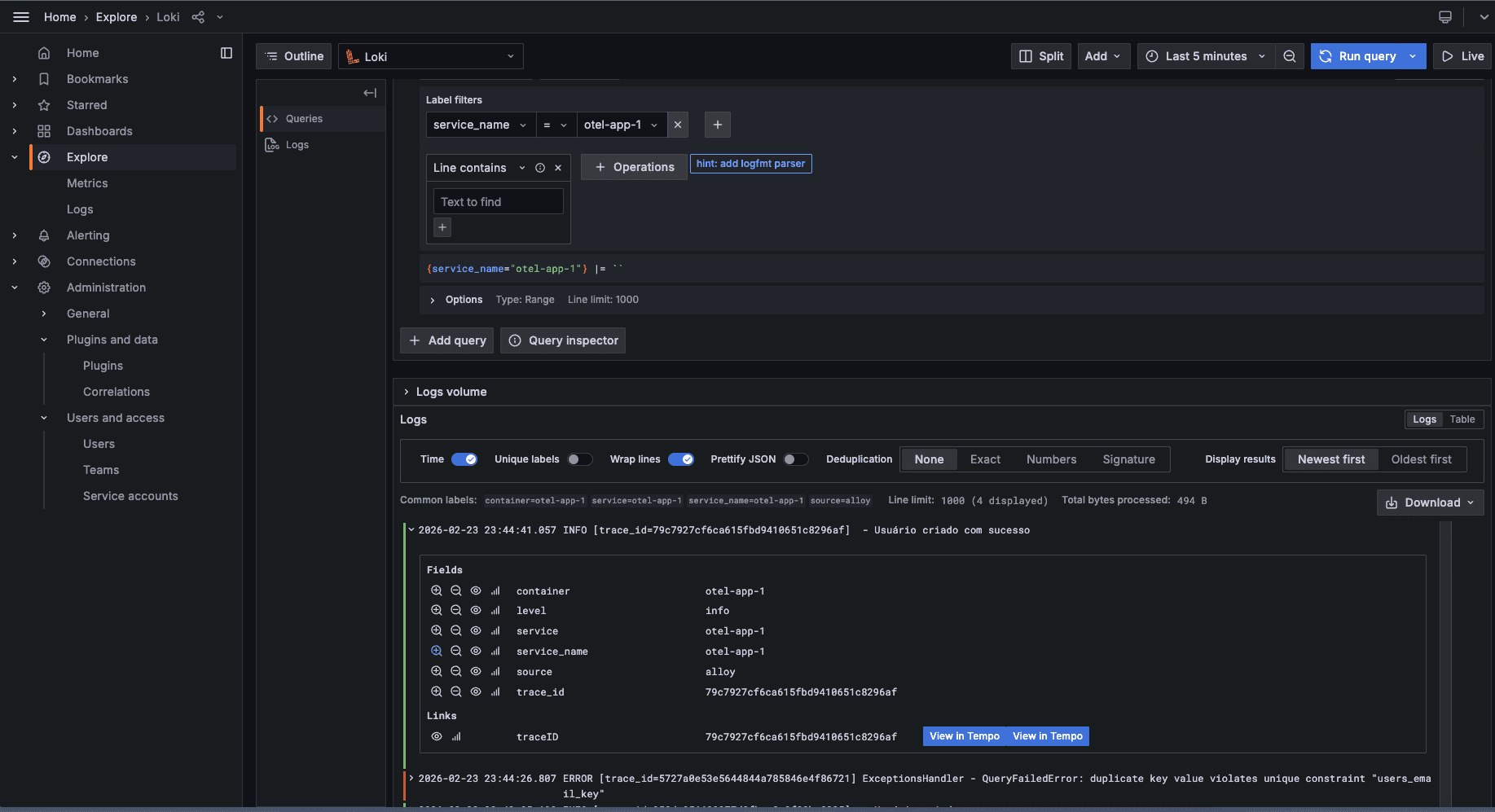
The User created successfully log line appears after the creation request. Among the fields, the most important is trace_id: it lets you correlate the log with the trace.
With logs in Loki and traces in Tempo, you have two separate backends. What connects them is the correlation ID: an identifier present in both logs and spans that lets you jump from the log to the trace in Grafana.
In OTel, that identifier already exists: it is the traceId, generated and propagated automatically. The next step is to ensure it also appears in logs.
For that, we build a custom logger that reads the active span and injects traceId into every line, extending NestJS ConsoleLogger:
import { trace } from '@opentelemetry/api'
import { ConsoleLogger } from '@nestjs/common'

function getTraceId(): string {
  const span = trace.getActiveSpan()
  return span?.spanContext().traceId ?? ''
}

export class TraceLogger extends ConsoleLogger {
  formatLine(level: string, message: string, context?: string): string {
    const traceId = getTraceId()
    const ctx = context ?? this.context ?? ''
    const tracePart = traceId ? ` [trace_id=${traceId}]` : ''
    return `${level.toUpperCase()}${tracePart} ${ctx} - ${message}`
  }

  log(message: string, context?: string): void {
    process.stdout.write(this.formatLine('info', message, context) + '\n')
  }

  error(message: string, stack?: string, context?: string): void {
    process.stdout.write(this.formatLine('error', message, context) + '\n')
    if (stack) process.stdout.write(stack + '\n')
  }

  warn(message: string, context?: string): void {
    process.stdout.write(this.formatLine('warn', message, context) + '\n')
  }
}
Each log line looks like INFO [trace_id=abc123...] Context - message. Alloy extracts trace_id via regex and promotes it to a Loki label:
stage.regex {
  expression = "trace_id=(?P<trace_id>[a-f0-9]{32})"
}

stage.labels {
  values = { trace_id = "" }
}
With trace_id as a label, Grafana can build an automatic link between Loki and Tempo. Configure a derived field on the Loki data source:
jsonData:
  derivedFields:
    - datasourceUid: tempo
      matcherRegex: 'trace_id=([a-f0-9]{32})'
      name: traceID
      url: '${__value.raw}'
      urlDisplayLabel: View in Tempo
When you open a log in Grafana, a “View in Tempo” link takes you straight to the full trace for that request, without copying the ID by hand.
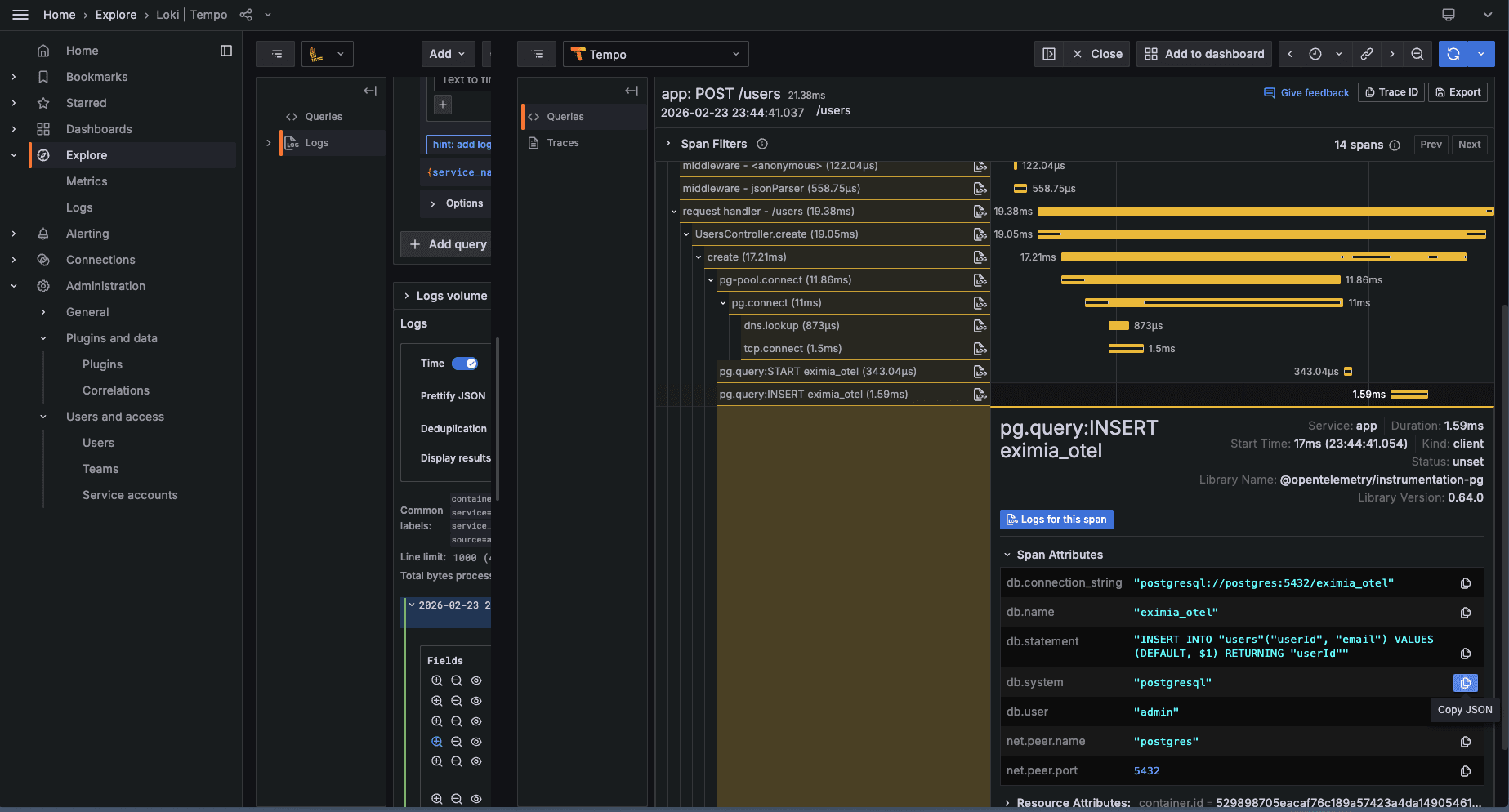
Notice the Express middleware layers and how each database query shows up as its own span.
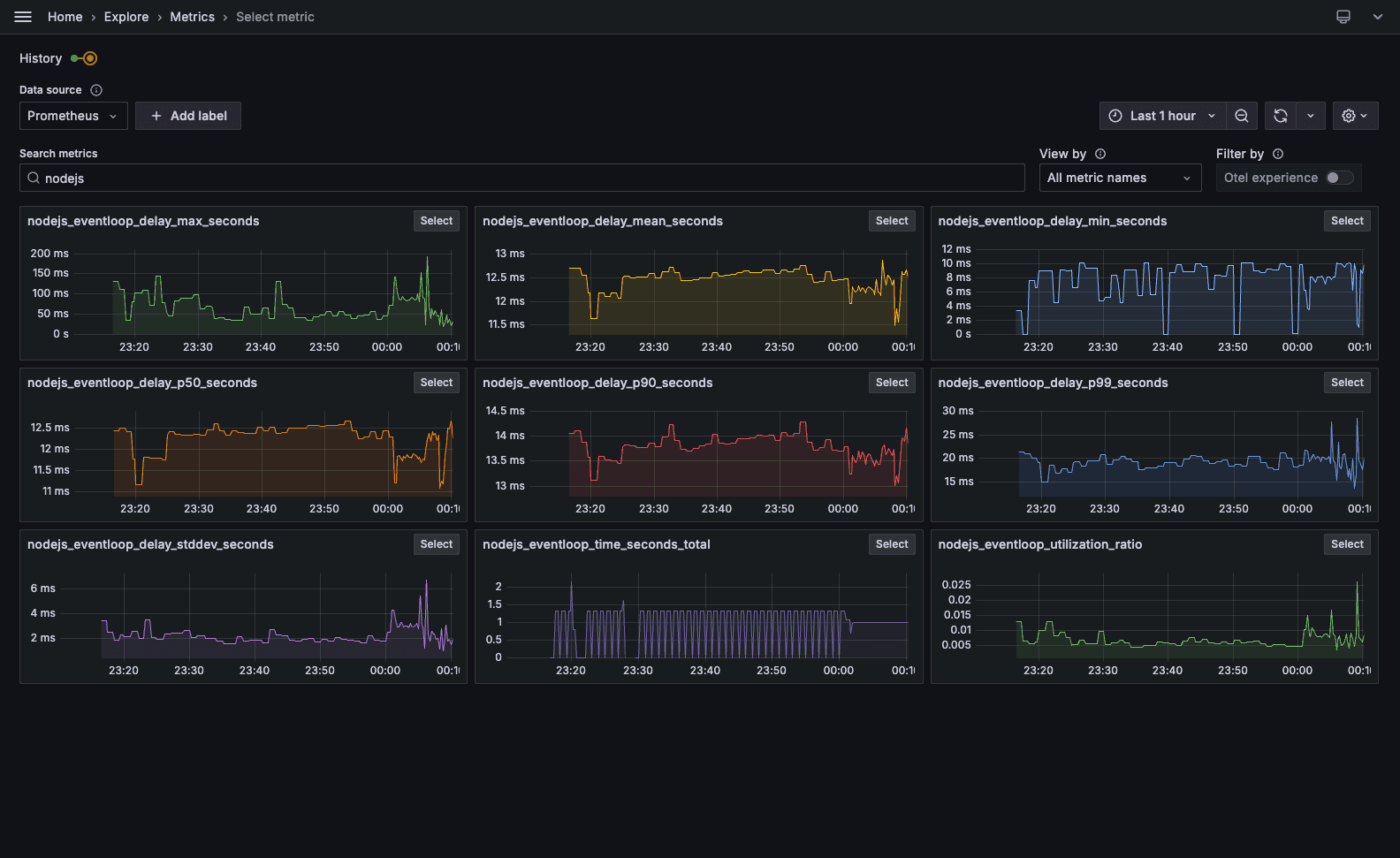
To explore metrics, open Metrics in Grafana. The Select metric card shows auto-generated charts. Here are useful metrics for API behavior and the Node runtime:
HTTP (APIs)
| Metric | Use |
|---|---|
| http.server.request.duration | Latency (histogram); basis for p50, p95, p99 and SLAs |
| Request count by http.response.status_code | Throughput and error rate (4xx, 5xx) |
| http.server.request.size / http.server.response.size | Request/response size; traffic and outliers |
Node.js runtime
| Metric | Use |
|---|---|
| process.runtime.nodejs.event_loop.utilization | Event loop utilization; high values suggest blocking risk |
| process.runtime.nodejs.memory.heap.used | Heap used; trends and leak detection |
| process.runtime.nodejs.memory.heap.total | Total heap (context for heap.used) |
| process.runtime.nodejs.memory.external | Off-heap memory (buffers, native); unexpected spikes may indicate native leaks |
| process.cpu.utilization | Process CPU usage |
Conclusion
With OpenTelemetry and collectors, your application emits logs, metrics, and distributed traces without rewriting your business logic.
The next time a request hangs, nobody has to guess. You open your observability tool, jump from log to trace in one click, and fix the cause, not the symptom. Observability does not fix bugs, but it removes the time spent on investigation.
That foundation supports proactive alerts, data-driven SLOs, and dashboards product teams can read. The base is in place: the system now speaks. You only need to learn to listen.